FAQ piqlConnect
Get your questions about piqlConnect answered
Subscription
What is piqlConnect?
piqlConnect is a web-based user interface to upload, manage and store data offline, off grid and secure on Piql’s long-term storage medium piqlFilm. piqlConnect also offers you to have a copy of your data online for immediate access, while a non-hackable copy is safely stored on piqlFilm in one of our piqlVaults or at the location of your choice. We also offer you an option to store in the Frozen cloud, which is storing data in the similar manner as on piqlFilm, but with quicker retrieval time and an annual recurring cost instead of a one-time perpetual cost. The full process and control you have through piqlConnect and you can manage metadata, retrieval of data and have a complete overview of your valuable information through the web interface.
How do I register?
You can easily register through our website app.piql.com You need to leave some basic information and then verify your user through a verification email or by using two-factor authentication. You can then either Join an existing Team (our name for account) or you can create your own Team. To do so you choose the subscription tier you would like, and then the payment method. ! Remember that you have 30 days of free trial before we charge you and you can cancel any time before the 30 days have passed.
Does it cost money to register?
No, we offer you a 30-day Free Trial to test out the program. After that we will charge you the monthly or annual fee with your preferred payment option that you choose when registering.
How many users can be in each subscription?
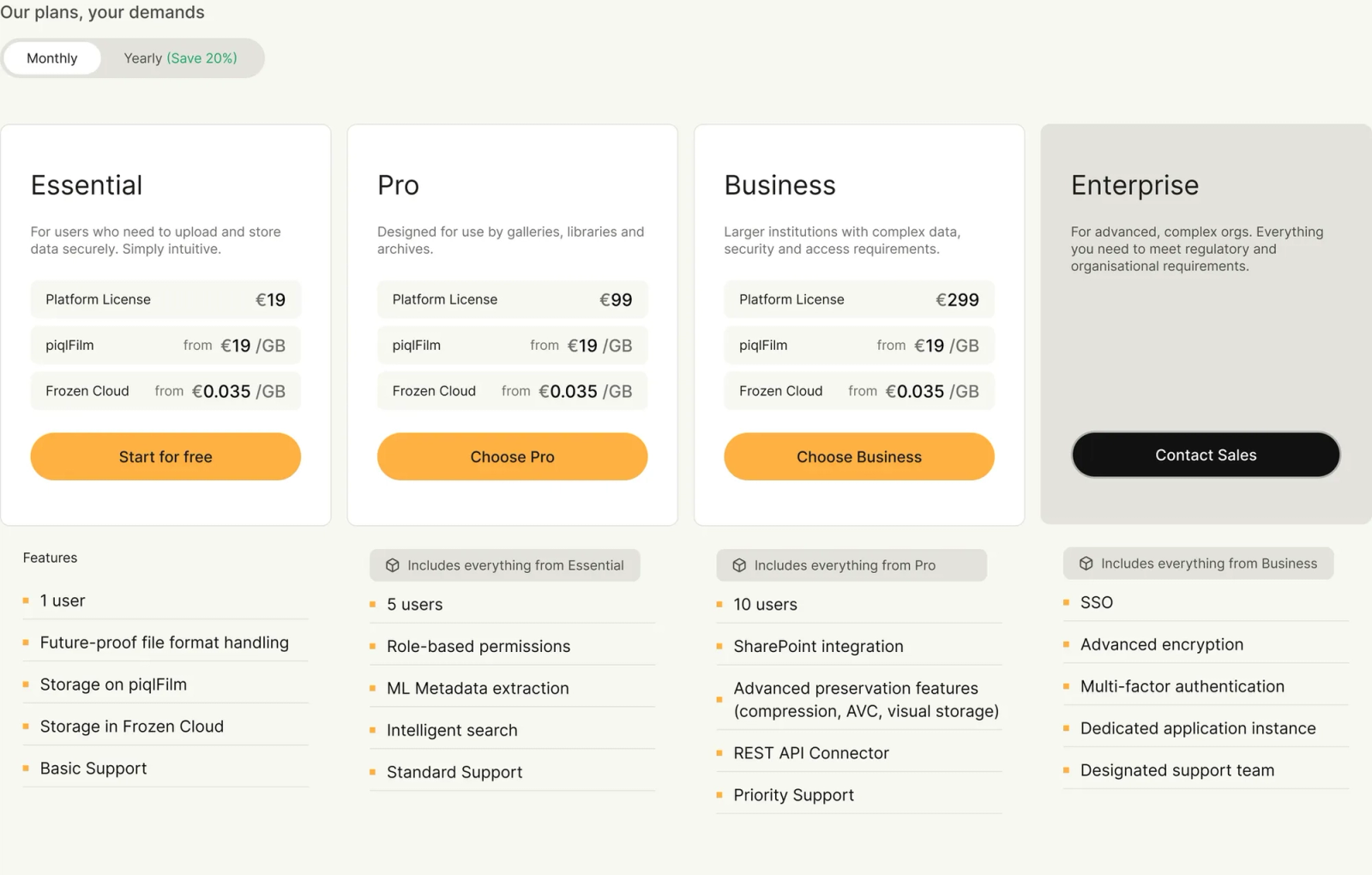
That depends on your subscription tier. Essential has one user, Pro has five users included and the Business tiers have 10 users included.
The users can be assigned three different roles
- Admin: hold all rights in the system
- Editor: can upload and manage data, but cannot manage users or billing
- Viewer: this role is mainly to have access to the system to view files, but cannot edit, upload or manage data.
Ask us if you need more users at support@piql.com
What subscription tiers do you have?
Currently, there are four different tiers of piqlConnect aimed at different type of users The tiers are Essential, Pro and Business. In addition, we have a customized plan for Enterprises. You can get in touch with our sales team to learn more about this - sales@piql.com
The subscription tiers are designed for different use and needs, to learn more go to www.piql.com/piqlconnect
Data management
How do I upload data to piqlConnect?
There are several ways to upload data to piqlConnect.
- You can do it directly in the user interface, with support for single and multiple files and single folders. It is not possible to choose multiple folders using the upload button.
- You can use our Drag&Drop functionality to also include multiple folders.
- Should you have lots of small files, we can recommend using an FTP connection as we have built-in support for this in piqlConnect. Our recommended FTP client is Filezilla. https://filezilla-project.org/
- You can also use our API to transfer files into the system. Get in touch with us and we will demonstrate how this can be done.
Does piqlConnect support metadata?
Yes, piqlConnect supports multiple ways of metadata;
Edit metadata
- Edit the metadata directly in the user interface on file and folders level.
- There is a standardised schema for all files that can be used. We are using globally renowned Dublin Core for this.
- There is also a pre-set schema for commonly used ISAD(G)
Extract metadata
- We offer to extract technical metadata from your files on upload - this is called Embedded metadata.
- Using machine learning, we can help generate descriptions and subjects (tags) for your files with thumbnails. Use the “Extract metadata” button on file level.
Import metadata
- You can easily create your own customised metadata schema. You do this in Settings - Metadata.
- You can import existing metadata schemas in CSV or Dublin Core XML on upload to populate the metadata to your files.
Do you have role permissions?
Yes, in piqlConnect you can have multiple users with different permissions to keep full control of your processes. Currently, there is three main users, Admin, Member and Viewer. You can change each role in the Settings area.
Can I intergrate with piqlConnect using any APIs?
piqlConnect has support for REST API to transfer files into the system for storage on piqlFilm as well as requesting retrieval from the same data. You find more information in our API documentation.
Can I have copy of data online?
Yes, you can choose to have a copy of your data stored online in the cloud after submission to piqlFilm. This is for instant access. You choose this when you are submitting your data to be stored on piqlFilm. Your data is also stored online while you are preparing your information to be submitted on piqlFilm. If you choose not to store the data online after submission we will delete the online files and the files will then only be stored on piqlFilm, but a retrieval request can be done through piqlConnect.
Where is my data stored in piqlConnect?
piqlConnect is hosted in a data center in Norway. This includes both the infrastructure for the service, the storage itself once in the system and once it is submitted to be stored in the Online or Frozen Cloud storage layer.
What is future-proofing of files?
Future-proofing of files is our way of using normalization a function of the preservation tier and implies the conversion of the file formats to accepted open-source archival formats, recommended by the international archival community. One of the main ideas of of piqlFilm is that it can be read in the future completely independent of all existing technology, something we called “self-contained”. To do so it is important that we store the data in open-source well documented formats to include the retrieval software, documentation and even the source code of the file formats on the piqlFilm. Like a digital time-capsule. piqlConnect offers to do this normalization of the files automatically and have support for a wide range of common formats. Should you have a format that is not common, we can help look how to normalize this format.
How do you define what formats to use for future proofing?
At Piql we separate the future proofing of files into two categories. Preferred formats and Accepted formats. Preferred formats are simple formats that are easier to deduce how work. An example would be a normalized tiff file where all each pixel is stored as a single point. Storing all pixels individually takes up a lot more space than using compression techniques. Accepted formats are widespread formats that are assumed to stick around for a long time. For example jpg and microsoft open office formats.
PDFs gets special handling. PDF is a complex format. We use VeraPDF to validate if the PDF is archivable. If the pdf is in any PDF-A format we set it as Preferred and if not it is an Accepted format.
What about other formats?
If you have turned on future proofing in your package, then we will try to convert your files to a Preferred format. For example, if you upload a png image file, we will try to convert it into a normalized tiff file. If we don’t support the conversion for that specific file format, the file will be labeled “Unsupported”. You can then get in touch with us to see if we can make an update and help you still convert it.
How do we detect formats?
We use the 'file' tool that is part of linux to figure out what the files MIME type is. If someone for example uploads a jpg as a tiff file, we will still detect that it is a tiff file. This will not work for everyfile type since there is not standard for how to detect file types. Some file types are based on other file types and are not possible to distinguish between or even made to be compatible with other formats.
How are the normalisation actually done?
We use multiple tools when converting. FFMPEG is used to convert audio files, ImageMagick is used for image conversions. We use libre office to convert some office documents to pdf. These are all best effort conversions and should be verified. A general solution can never be as good as customizing the conversion for spesific files.
When the new file is created, it will be larger then the original. If a image file is converted, then the program removes the compression and saves the converted image pixel by pixel without any compression. By default we won't change your file, but there is a setting that is available for removing the original file after it has been converted.
Are there any limitations to what files you can normalize?
Due to processing limitations, we only process files less than 100 MB. If this is a problem, we might be able to help you in other ways. We also currently only support normalization of video formats outside of the applicaiton.
Other
Which languages do you support?
piqlConnect is currently supporting five languages, including Norwegian, English, Spanish, French and Portuguese. You can easily change the language in the Settings. If you have another language you would like support for or you find language mistakes in the software you can contact us support@piql.com
Do you have a privacy policy?
Yes, in Piql we are concerned about our clients’ privacy and follow standards to comply with international privacy laws. You can find more information in the terms and conditions of the service.